Free for macOS 14 and later
A bin man for your Mac.
Bin Man finds the clutter on your Mac that's safe to delete: app caches, old logs, Xcode's leftovers, package caches and forgotten downloads. You tick what goes. Collection only ever moves things to the Trash, so anything can be put back.
Bin Man is a Mac app, so it installs on the Mac, not here. Send yourself the link:
Pick a bin and he'll lift the lid. Poke him if you like.
Kerb's empty
This is a demo with pretend sizes. The real one looks at your Mac, and collecting moves things to your Trash.
How it works
Right then. Here's the round.
He looks
He walks the street and measures each bin: names, sizes and dates only. He never opens a file. The fuller the folder, the fuller the bin.
You tick
Tick what you agree with and it goes out on the kerb as a bag. Nothing has moved yet. Untick it and it comes straight back in.
The lorry comes
Press Collect (it asks first) and everything on the kerb goes to the Trash. Changed your mind? Put it back, as long as it's still in the Trash.
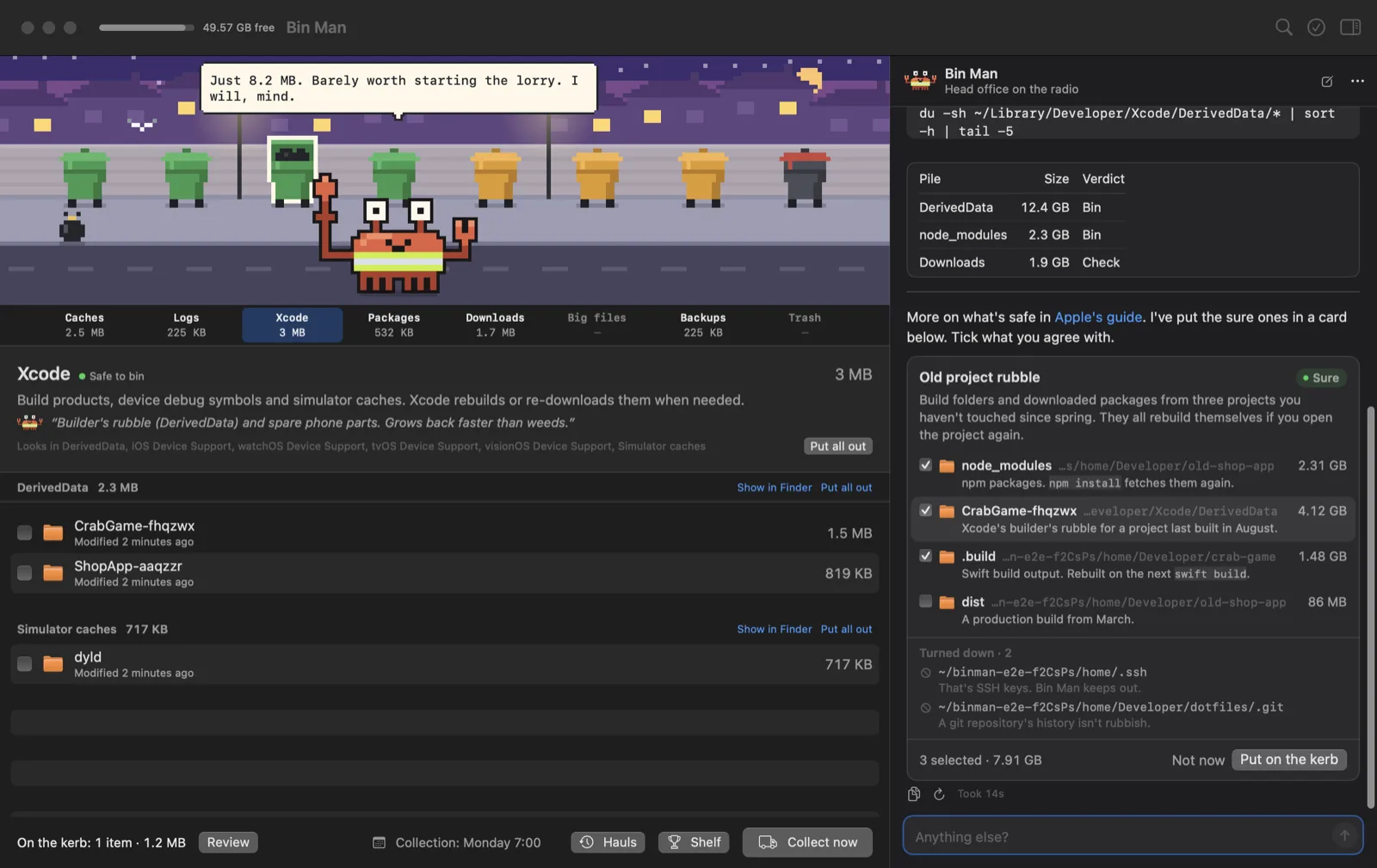
The real thing: the street, the Xcode bin open, and a suggestion from head office on the right.
What he checks
Eight bins. One for each kind of clutter.
Green bins are safe to bin. Amber ones are your stuff, so have a look first. The dark one with the red lid is the Trash.
Crumbs
App caches
Safe to bin
Temporary files apps keep to load faster, in ~/Library/Caches. Apps rebuild them when needed. macOS's and iCloud's own are left alone.
Old diaries
Logs
Safe to bin
Diagnostic logs apps write in ~/Library/Logs. Only useful when you're chasing a crash.
Builder's rubble
Xcode
Safe to bin
DerivedData, device support files and simulator caches. Xcode rebuilds or downloads them again when it needs them.
The warehouse
Package caches
Safe to bin
Copies your developer tools already downloaded once: npm, pnpm, Yarn, Bun, pip, Cargo, Gradle, CocoaPods, Homebrew. They fetch them again on the next install.
The porch pile
Old downloads
Have a look first
Things in Downloads you haven't touched in 90 days (you can change that). Installers, zips, forgotten PDFs. Your call, so have a look.
Big lumps
Big old files
Have a look first
Files over 500 MB you haven't changed in a year, in Movies, Documents and Desktop. Could be treasure, so look first.
The attic
Backups and archives
Have a look first
Xcode archives and old iPhone or iPad backups. Might be the only copy, so keep any you still need.
The skip
Trash
Already in the Trash
What's already in your Trash. Emptying it is the only thing Bin Man deletes for good, and it asks first, separately.
The safety promise
Safe as houses.
The rules he works by. They're written into the app's code, not just this page, and the code is open for anyone to read.
The Trash, and only the Trash
Collecting moves things to the Trash with macOS's own Move to Trash. Emptying the Trash is a separate button that asks again. It's the only thing Bin Man deletes for good.
Put it back
Every collection is written down: what went and where it came from. "Put it back" returns it to where it was, and never overwrites anything that's appeared there since.
Nothing without a tick
He suggests. You tick. Nothing goes on the kerb that you didn't tick, and nothing leaves the kerb until you collect. Bin day asks first unless you tell it otherwise.
A keep list
"Keep this, stop suggesting it" on anything, and he never shows it to you again, never puts it out, and head office can't suggest it either.
Private places are off limits
SSH and GPG keys, cloud credentials, keychains, iCloud Drive, Mail, Messages, Calendars, Contacts, browser profiles, password managers, Photos and Music libraries are never looked into, in one place in the code, for everything.
Inside your home folder only
He only touches things inside your home folder, never follows a link out of it, and refuses anything whose path has changed since it went on the kerb.
Bin day
Same day every week.
Like the real thing: set it once and your Mac stays tidy without you having to remember.
- Pick a day and a time in Settings, like real bin day. Thursday at 9 in the morning, unless you choose another.
- The evening before, a notification: "Bin day tomorrow. Anything to put out?"
- On the day he asks before collecting. Or, if you turn it on, he collects by himself and tells you what went.
- The menu bar shows free space, what's on the kerb, the next bin day and the last haul.
Head office (optional)
He radios head office.
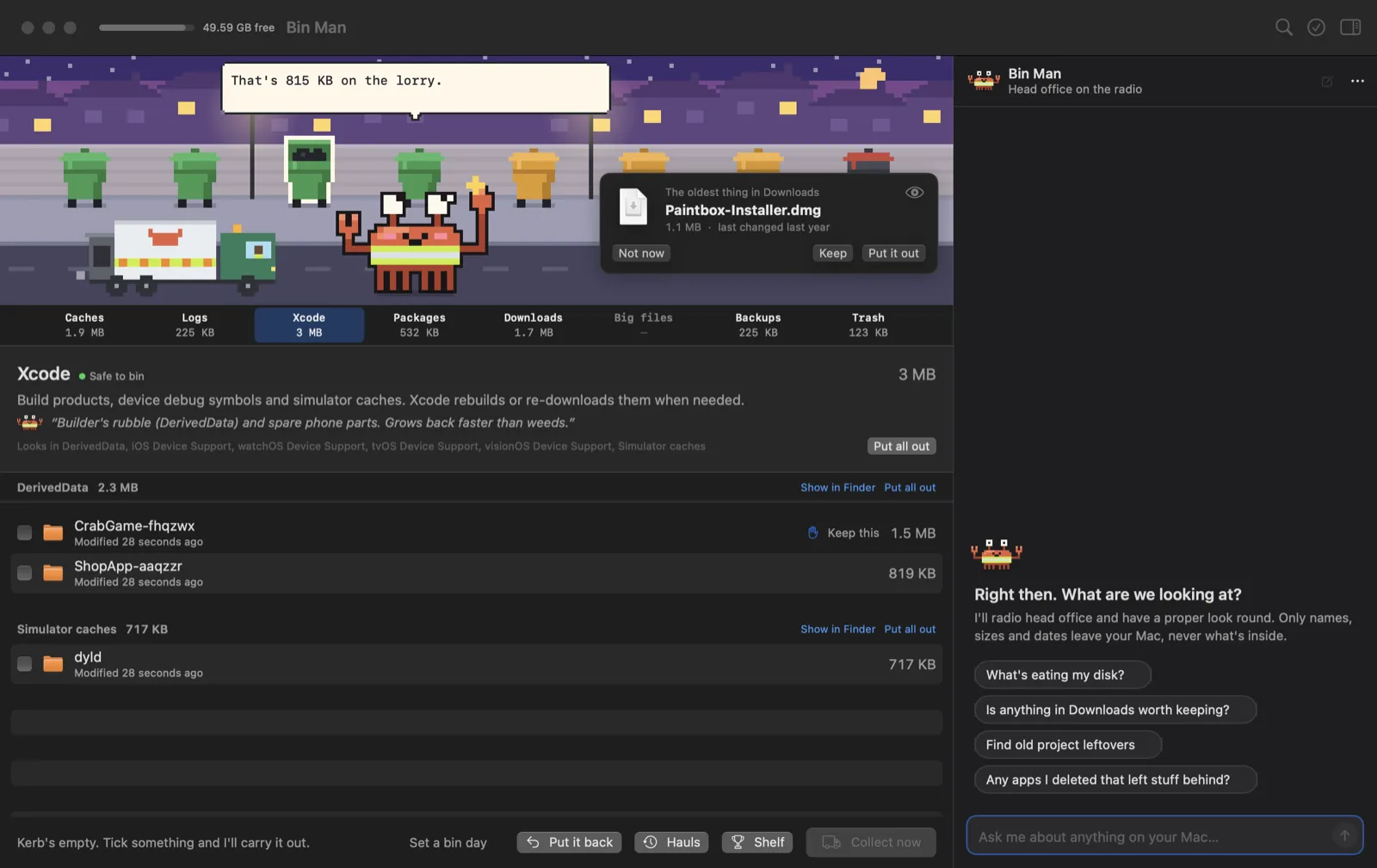
Head office is Claude. Ask "What's eating my disk?" and it looks around for things rule-based cleaners miss, like old project build folders and leftovers from apps you've deleted, then suggests a cleanup for you to approve.
Optional. Needs Claude Code installed and signed in on your Mac (run claude in Terminal once). It uses your own Claude account and plan. Bin Man never asks for an API key.
What goes to head office
Only while you're using the chat, through your own Claude Code sign-in:
- A short note: free and total disk space, and each bin's name, size, item count and rating.
- What you type, and the question behind any button you press.
- Names, paths, sizes and dates from the read-only tools head office uses, all inside your home folder.
- Bin Man's checks on any suggestion (paths, sizes, and why anything was turned down).
What never goes
- What's inside any file. Ever.
- Anything in the private places listed above.
- Your keep list's paths or your settings.
- Anything at all when you're not using the chat.
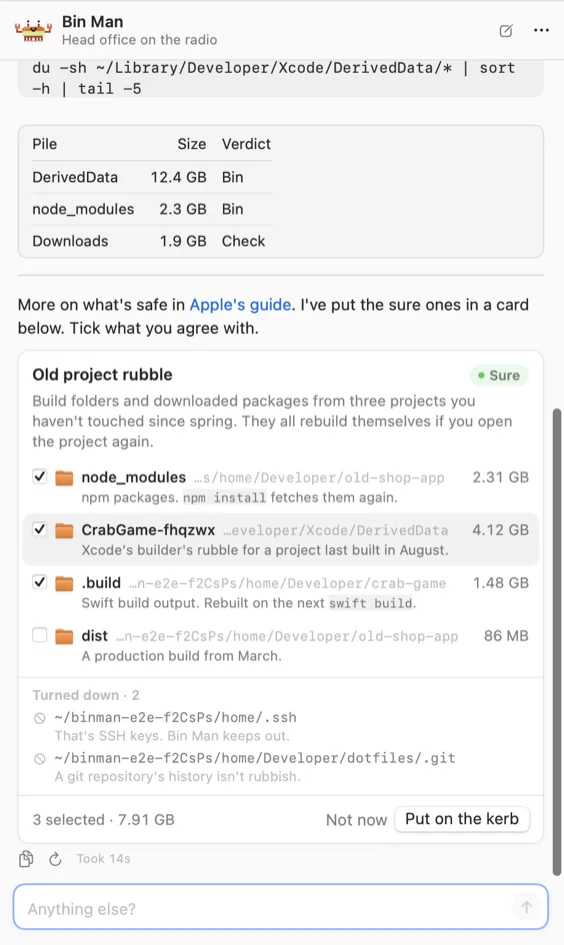
Head office can look (names, sizes, dates) and suggest. It can't delete, move, open or change anything, and it can't change your settings, your keep list or the kerb. A suggestion arrives as a card: you untick what you disagree with and press "Put on the kerb".
Install
Get him on your round.
Download Bin Man
Press the download button. You get a file called Bin-Man.dmg in your Downloads folder.
Open it and drag him in
Double-click Bin-Man.dmg. A window opens: drag Bin Man onto the Applications folder. Then you can eject the disk image (the eject button next to it in Finder's sidebar).
Open Bin Man
Open Applications and double-click Bin Man. He's signed by the developer and checked by Apple (notarized), so macOS opens him normally. If macOS asks whether you're sure about an app downloaded from the internet, choose Open.
Say yes to the folder questions, or don't
The first time he looks, macOS asks whether Bin Man may access your Downloads, Documents and Desktop folders. Downloads is for old installers; Documents and Desktop are only for very big files you haven't touched in a year. Say no and those bins stay empty; everything else works.
Full Disk Access, if you like (optional)
macOS keeps the Trash and iPhone backups behind Full Disk Access. To let him see those two bins: System Settings, Privacy & Security, Full Disk Access, then switch on Bin Man. Without it, he simply tells you he couldn't look.
Which Macs: Any Mac, Apple silicon or Intel, running macOS 14 Sonoma or later. Signed with a Developer ID and notarized by Apple. Updates itself.
Bin Man is a Mac app, so it installs on the Mac, not here. Send yourself the link:
Questions
Fair questions.
Is it safe?
He only suggests things from places junk is known to collect, rates every bin (safe to bin, or have a look first), and nothing moves until you tick it and collect. Collecting moves things to the Trash, so you can put them back. Private places like your keys, Mail, Photos and iCloud Drive are never looked into.
What does it send, and where?
Bin Man reads names, sizes and dates of files, never what's inside them. It sends nothing anywhere unless you use the optional head office chat, which goes through your own Claude Code sign-in to Anthropic. The privacy page lists exactly what that chat sends. Read the privacy page.
Why does macOS ask about my Downloads, Documents and Desktop?
macOS protects those folders and asks you before any app looks in them. He looks in Downloads for old installers, and in Documents and Desktop only for very big files you haven't touched in a year. Say no and those bins stay empty; everything else works.
Do I need Claude?
No. The street, the bins, the kerb, collecting, putting back and bin day all work without it. Head office is an extra for people who already have Claude Code: it can look around further and suggest cleanups for you to approve.
Does the chat cost anything?
It uses your Claude Code plan, the same as using Claude Code in Terminal. Each answer is capped so a runaway can't happen.
Where did the space go after collecting?
To the Trash. The space comes back when the Trash is emptied, by you in Finder or with the Trash bin's own Empty button.
How do I uninstall it?
Quit Bin Man and drag it from Applications to the Trash. To remove everything it kept too, delete the folder ~/Library/Application Support/BinMan and the file ~/Library/Preferences/uk.co.stevenmckinnon.binman.plist.
Is it free?
Yes. Free, with no account, no subscription and no ads. The code is open source under the MIT licence, on GitHub.
Does it update itself?
Yes. When a new version comes out, Bin Man offers to install it. Updates come from the project's GitHub releases and are signed, so only genuine updates install.
Which Macs does it run on?
Any Mac, Apple silicon or Intel, running macOS 14 Sonoma or later.